Tmux: GitHub picker
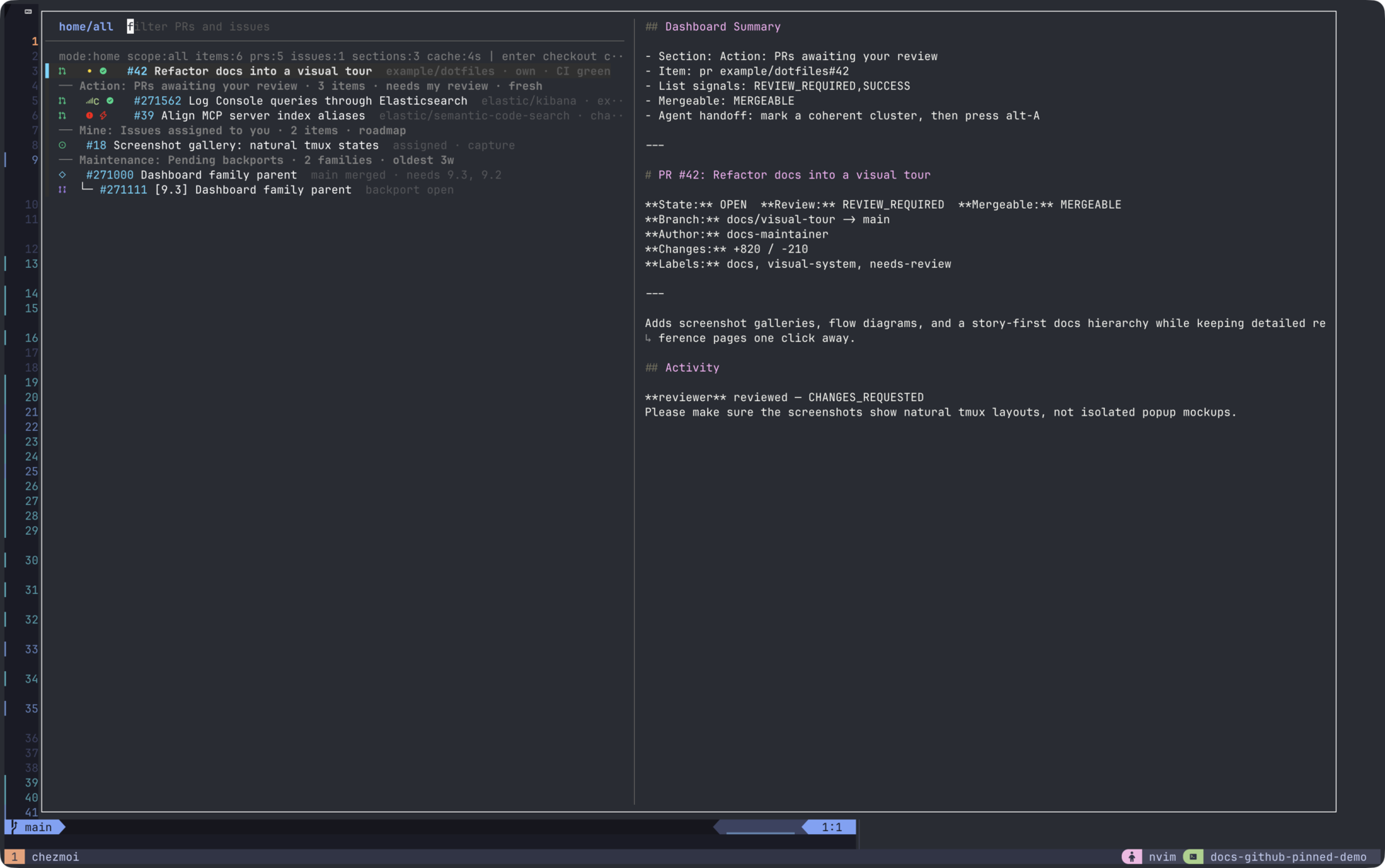
A standalone fzf-based PR/issue picker. It reads PR and issue sections from its own YAML configs and displays them in fzf with rich preview, worktree markers, and review status badges. gh-dash is not a dependency.
Open it with prefix + G (95%×95% popup). Press alt-g to switch to the session picker.
Bindings
| Key | Action |
|---|---|
prefix + G | Open GitHub picker popup (95%×95%) |
enter | Checkout worktree + focus (batch if items marked) |
alt-i | Create a new issue (opens $EDITOR; optional worktree + session) |
alt-E | Create an epic: parent issue + authored sub-issues (optional worktree) |
alt-A | Hand off current/marked PRs or issues to Ralph (ralph go) with a generated dashboard context file |
alt-b | Checkout + open Octo review (PRs only) |
ctrl-t | Batch worktree create (marked items) |
alt-o | Open in browser |
alt-y | Copy URL(s) to clipboard |
tab | Mark/unmark item (multi-select) |
alt-space | Mark/unmark item (alternate toggle) |
alt-M | Mark the entire family under the cursor (parent + all children) |
alt-z | Collapse / expand the family under the cursor (parent glyph flips between ▾ and ▸) |
alt-Z | Global collapse-all / expand-all toggle for the current mode + scope |
ctrl-s | Switch work/home mode |
ctrl-r | Refresh from GitHub (current mode); query preserved, cursor stays at the same row index (see the session picker's How refresh preserves position — same mechanism applies here, no --id-nth set) |
alt-g | Switch to session picker |
alt-c | New comment (opens $EDITOR) |
alt-r | Quote-reply a comment (not refresh — see note) |
alt-d | Edit your own comment |
alt-e | Cycle preview: collapsed → body → all expanded |
alt-0 | Show all dashboard sections |
alt-1 | Switch to the Focus scope: Action: + Mine: + Maintenance: sections (work you own or must act on) |
alt-2 | Switch to the Explore scope: Watching: sections (informational, not your turn) |
alt-n / alt-p | Jump cursor to the next / previous section header (wraps at the ends) |
alt-S | Cycle item sort: created-desc → updated-desc → age-asc → repo-asc → repeat (headers stay anchored; items re-sort beneath their own header) |
alt-x | Open the command palette (close / reopen / approve / request-changes / merge / label add / label rm / comment / rr) against the cursor or marked items |
ctrl-/ | Toggle preview |
? | Show keybinding help |
alt-j / alt-k | Page down / up |
shift-up/down | Scroll preview (line) |
shift-left/right | Scroll preview (page) |
alt-ris quote-reply here, not refresh. The GH picker'sctrl-ris fully synchronous and pre-empts any in-flight fetch (gh_items.shkills the running fetch and starts a fresh one), so there is no separate "force full refresh" key. The session picker usesalt-rfor force-full because itsctrl-ronly blocks on the quick scan and backgrounds the full rescan.
Entry source
Items come from the gh picker's standalone config files (~/.config/tmux/scripts/pickers/github/gh-picker-work.yml and ~/.config/tmux/scripts/pickers/github/gh-picker-home.yml). Each file defines prSections and issuesSections with title and filters (GitHub Search syntax). The Python fetcher (lib/gh_items_main.py) parses these YAML files, runs GitHub Search API queries, and formats results as fzf-consumable TSV.
Sections are named by intent, not by data type. Each section's title carries a prefix that tells you what the rows represent for your workflow:
| Prefix | Meaning |
|---|---|
Action: | You are the bottleneck — review requested, assigned issue, etc. |
Mine: | You authored it and it is still open (not currently bottlenecked) |
Watching: | Informational — team queues, mentions, involves, failed-test radar |
Maintenance: | Special workflows (pending backports) |
PRs and issues coexist under the same intent prefix; the YAML still splits prSections and issuesSections for filter ergonomics, but the dashboard layout groups by intent so paired sections (e.g. Action: PRs awaiting your review and Action: Issues assigned to you) appear next to each other.
Within each section, items are sorted by GitHub creation time, newest first. The Maintenance: Pending backports section sorts parent PRs the same way; sub-rows under each parent stay grouped by target branch.
Dashboard scopes
The GitHub picker has two navigation dimensions:
- Mode (
ctrl-s):workvshome, selecting which config/cache to use. - Scope (
alt-0..alt-2): a view over the current mode's sections, mapped to intent prefixes.
Scopes are intentionally layered on top of the existing cache. all keeps the previous full dashboard behavior; the narrower scopes are intent-aligned slices of the same data:
| Scope | Binding | Includes |
|---|---|---|
all | alt-0 | All sections |
focus | alt-1 | Action: + Mine: + Maintenance: sections — work you own or must act on |
explore | alt-2 | Watching: sections — informational, not your turn |
The cockpit header shows mode, scope, item counts, cache age, and the main workflow actions. Section headers include item counts, age summaries, and the reason the section exists. Scope switches preserve the bright icon-heavy row style. The hidden fzf match key also includes exploration tokens such as repo, author, assignee, labels, state, local worktree status, review status, CI status, and conflict status, so typed searches can narrow by relationship or status without changing the visible row format.
Navigation: jump and sort
alt-n and alt-p jump the cursor to the next or previous section header. The fetcher (lib/gh_items_main.py) writes a sidecar ~/.cache/tmux/gh_picker_offsets_{mode}_{scope}.json containing the 1-indexed row of every header in the rendered TSV; the helper script (lib/gh_picker_jump.sh) reads FZF_POS, looks up the next/previous header row in that JSON, and emits an fzf pos(N) action via a transform binding. Jumps wrap at both ends. Offsets are recomputed on every fetch, scope switch, sort change, and post-mutation reload, so the row indices always reflect what fzf is currently showing (with an empty query — typed queries change the filtered list and may move headers off-screen).
The helper is intentionally pure bash with no subprocess spawns in its hot path (
$(<file)reads plus a regex loop over the JSON; nopython3/cat/awk).transformblocks fzf input while it runs and fires once per keypress, so an earliercat+python3implementation cost ~85 ms/press: held or rapidly tappedalt-n/alt-pqueued faster than they drained, blocking the UI and marching the cursor through the backlog until it cleared. The bash version is ~10 ms/press, below the key-repeat interval, so bursts stay real-time.The earlier
alt-]/alt-[bindings were dropped becauseESC [is the CSI prefix that starts every arrow / function-key sequence: fzf's terminal reader explicitly returnsInvalidforESC [alone and only re-evaluates after another byte arrives (src/tui/light.gocase '[', 'O'→len < 3→Event{Invalid}), so a soloalt-[press stayed pending until the next keystroke flushed it.alt-n/alt-phave no CSI ambiguity and fire immediately.
alt-S cycles a single-process sort key persisted at ~/.cache/tmux/gh_picker_sort:
| Key | Behavior |
|---|---|
created-desc | Default — newest GitHub creation time first within each section |
updated-desc | Most recently updated first |
age-asc | Oldest creation time first — surfaces stale rows |
repo-asc | Group by repo (ascending); secondary key is creation time |
The fetcher emits two hidden TSV columns (sort_created, sort_updated) for every item row so the sort can be applied without re-fetching from GitHub. Headers stay anchored — only the items between two headers are reshuffled. The current sort is shown as a transient tmux display-message toast on each cycle.
Maintenance: Pending backports section
A section can opt into custom logic by adding source: backport-failures (see prSections[].source in the work config). The fetcher runs the section's filters to seed a candidate list of merged PRs, then determines per-PR whether any backport target is still pending. A target branch is pending when it is requested by current labels and has no merged backport PR.
The pending check combines three signals so the section reflects reality even when the bot's comment trail is incomplete:
kibanamachinecomment tables (## 💔 All backports failed/## 💚 All backports created successfully) — the historical record of bot attempts.- Current
v<X>.<Y>.<Z>labels — branches whose label was removed are dropped (no longer needed). When the parent PR'sbaseRefNameismain, the highest version label is treated as the main development version and excluded. If the PR has no version labels, this filter is skipped (preserves behavior on repos with different conventions). - Title search for
[<branch>] … (#<parent>)PRs — manually-cherry-picked backports that the bot never commented about are still detected, with their actualstate(MERGED/OPEN/CLOSED).
Hierarchy and families
Sections nest related items under a parent row. Three flavors of relationship are detected:
- Issue epics. Issues with a GraphQL
parent(or withsubIssuesSummary.total > 0) become epic parents. Children that live in the same section nest directly; when a child's parent is missing (different section, different scope, or not assigned to you), a phantom parent row is fetched once and inserted so the relationship is visible. - PR backport families. A merged or open backport PR is grouped under its source PR via three signals —
kibanamachine-style title ([<branch>] … (#<parent>)), body markers (Backport of #N/Backports #N), andbackport/<branch>/pr-Nbranch names. The parent PR is inserted as a phantom row when not already in the section. Each child row shows its target branch (e.g.↳ 9.3). - PR ↔ Issue cross-links. Every PR's
closingIssuesReferencesand every issue'sclosedByPullRequestsReferencesare fetched alongside epic / family metadata. Each row that has an active partner gets a↳ #N(or↳ closes #N) badge so you can spot "the PR fixing this issue" or "the issue this PR closes" without opening the preview. The badge prefers an OPEN partner; if none, it falls back to the first reference and dims the color. The hidden match key gainslinked,closes:N, andclosed-by:Ntokens so you can fzf-filter by relationship (closes:239902jumps to PR #271562,linkedshows every cross-linked row). When both partners happen to live in the same section and are both loose (neither is an epic nor a backport-family root), the picker nests the PR under the issue as a bonus; the depth limit of two levels is preserved, so epic-children or family-roots that cross-link to another row stay loose and rely on the badge alone.
The Maintenance: Pending backports section keeps its existing layout (it is still the source of truth for missing backports); the new family grouping applies to the rest of the dashboard.
Visual cues:
| Symbol | Meaning |
|---|---|
⬢ | Epic root (issue with sub-issues) |
◇ (on a parent) | PR family root (a PR that has detected backports under it) |
├─ / └─ | Tree glyph for a non-last / last child in the family |
▾ / ▸ | Parent collapse state — expanded / collapsed |
(N hidden) | Dim suffix on a collapsed parent showing how many child rows are hidden |
8 / 20 done | Dim cyan badge on an epic parent showing subIssuesSummary.completed / total |
↳ #N | Inline cross-link badge: closing PR (on an issue row) or closed issue (on a PR row) |
1 epic / 1 PR family | Header counters that summarise how many families a section contains |
Bindings (see the binding table above for the full list):
alt-ztoggles the family under the cursor; the choice is persisted to~/.cache/tmux/gh_picker_collapsed_{mode}so it survives refreshes, scope switches, and mode switches.alt-Zis the global toggle. When nothing is collapsed it collapses every visible parent; otherwise it clears the collapse set.alt-Mmarks every row in the current family in one shot, so the command palette can run on the entire epic (e.g. close + comment loop over an epic and all its children).
Sorting interacts with hierarchy: alt-S cycles the same four keys (created-desc → updated-desc → age-asc → repo-asc), but each family is treated as a single block sorted by its parent's attributes. Children are reordered among themselves under the same key, never crossing family boundaries. Loose (un-nested) items interleave with family blocks by their own keys, so the visible order stays predictable without breaking the tree.
GraphQL cost: the metadata phase that powers review/CI badges is reused. Issues fetch parent + subIssuesSummary + closedByPullRequestsReferences(first: 5) per chunk of 10; PRs fetch closingIssuesReferences(first: 5) alongside headRefName / reviewDecision / CI per chunk of 5 — both run in parallel. Phantom parents (missing from any visible section) are batched in a single follow-up call, capped at 30 per refresh to keep cold-cache latency bounded. Warm cache reads do no extra IO — sort, family grouping, cross-link nesting, and collapse all run post-read in Python.
Inline badges
| Badge | Meaning | Color |
|---|---|---|
◆ | Local worktree exists | cyan (38;5;81) |
◌ | Worktree creation in progress (batch) | amber (38;5;221) |
| PR review — approved | green (38;5;42) |
| PR review — changes req. | red (38;5;196) |
| `` | PR review — pending | yellow (38;5;220) |
● (green) | CI — success | green (38;5;42) |
● (red) | CI — failure | red (38;5;196) |
● (yellow) | CI — pending | yellow (38;5;220) |
⚡ | Merge conflict (CONFLICTING) | orange (38;5;209) |
Review and CI badges are fetched via a chunked GraphQL phase that runs after the section searches and in parallel with the local worktree scan. PRs are split into small chunks (~5 per request) issued concurrently — GitHub's GraphQL evaluates aliases mostly serially within one request, so several small parallel queries finish far faster than one large batch.
The CI badge reflects real CI, not the raw status-check rollup. Trivial/bot contexts (CLA, prbot:*, renovate/*, license/*, security/*, docs previews) are excluded: a failing trivial context (e.g. prbot:outdated) no longer turns the badge red while the canonical pipeline (<repo>-ci, e.g. kibana-ci) is green. A failing non-trivial required check still overrides a green canonical context and shows red. The same rule is shared by the session picker's CI badge.
The conflict badge is also sourced from GraphQL (mergeable=CONFLICTING). If GraphQL metadata is temporarily unavailable during a refresh, the picker keeps the last-known conflict badge until fresh metadata is fetched; in that case the badge is shown dim to indicate it may be stale (use ctrl-r to force revalidation).
Similarly, when GraphQL metadata is temporarily unavailable, the picker may show last-known review / CI badges in a dim style rather than dropping them abruptly.
Worktree detection
The picker detects whether a PR or issue has a local worktree using a 3-tier heuristic:
comma.w.issue.numberworktree-local git config (authoritative, set by,w)- Branch name suffix extraction (
-NNNor/NNN) - Batched GraphQL
headRefNamematching against local worktree branches (catches PRs checked out by,w prs)
For issues, the picker also treats an issue as "local" when it is linked from an existing session/worktree entry in the session picker cache (e.g. via PR closing-issue references). This keeps issue indicators consistent across pickers.
Actions
-
enter(no marks): single-item checkout. On a PR, runs,gh-worktree pr <owner/repo> <number> --focus; on an issue, runs,gh-worktree issue <owner/repo> <number> --focus(interactive branch prompt if the worktree doesn't exist yet). Exits the picker. -
enter(items marked): batch worktree creation for all marked items (same asctrl-t). PRs are created automatically; issues open$EDITORwith a batch naming buffer. Stays in the picker. -
ctrl-t: explicit batch worktree creation (same asenterwith marks).Batch creation runs in the background and gives progressive feedback entirely through the dashboard markers — it prints nothing to any tmux pane. Each item flips to the amber
◌loading marker the instant its creation starts, then to the cyan◆marker on success (or reverts to no marker if it is skipped or fails). There is no end-of-batch popup or pane summary; the final marker state is the result. A reverted (no) marker after a run means the item was skipped or failed — e.g. a "repo not found locally" skip, which happens when neither the--repo-pathhint nor the conventional checkout (~/work/<repo>forelastic/*, else~/code/<repo>) resolved to a git worktree. -
alt-i: create a new issue — resolve the target repo (defaults to the cursor row's repo), compose title + body in$EDITOR, create via the REST API, then optionally create a worktree + focus its session. Stays in the picker (and refreshes) unless you opt into the worktree. -
alt-E: create an epic — likealt-i, but the buffer's first section is the parent issue and each----separated section below is a child issue; children are created and linked to the parent via the sub-issues API. -
alt-bon a PR: same as singleenter, then opens Octo review in a new tmux window. -
alt-o: opens the PR/issue URL in the browser. -
alt-y: copies the URL(s) to the clipboard. -
alt-c: new comment — opens$EDITOR, posts on save. -
alt-r: quote-reply — pick a comment via fzf, quote it, open$EDITOR. -
alt-d: edit own comment — pick one of your comments via fzf, edit in$EDITOR. -
alt-A: Ralph handoff — writes a Markdown context file for the current row or marked PRs/issues, closes the picker, then prompts for a,ralph gogoal seeded with the selected GitHub references and context path. The context includes titles, URLs, labels, state, review/CI relationship metadata, PR closing issues, and issue closing PRs when GitHub lookups are available. -
alt-x: command palette — see below. -
If the repo does not exist locally,
,gh-worktreebootstraps it first via,gh-tfork.
Create issue / epic (alt-i / alt-E)
Both keys create new GitHub issues without leaving the picker. They are global actions (independent of the cursor item), so they live on dedicated keys rather than in the alt-x palette (which requires a cursor PR/issue).
- Target repo. A small fzf prompt resolves the repo, seeded from the distinct repos in the current cache and pre-filled with the cursor row's repo. Press
enterto accept, or type anyowner/repoto override. - Compose.
$EDITORopens on a buffer:alt-i(issue): the first non-empty line is the title, the rest is the body.alt-E(epic): the first section is the parent issue; each section below a line containing only---is a child issue (its first line is the title, the rest is the body).- Full-line
<!-- ... -->instruction lines are stripped, so#Markdown headings in bodies are preserved. Saving an empty buffer cancels.
- Create. The issue is created via the REST API (
gh api repos/<repo>/issues). For epics, each child is created and linked to the parent with the sub-issues GraphQL mutation (addSubIssue, with thesub_issues/issue_typesfeature headers) — the same relationship the dashboard renders as a⬢epic. - Optional worktree. After creation you are asked
Create worktree + focus session now? (y/N)(default no):- No: the dashboard refreshes via the fzf listen socket so the new issue/epic appears (under
Mine:for the current scope), and the picker stays open. - Yes: the picker closes and the new issue (the parent, for epics) is routed through the normal checkout path —
,gh-worktree issue <repo> <number> --focuswith the interactive branch-name prompt, bootstrapping the repo via,gh-tforkif it is not present locally.
- No: the dashboard refreshes via the fzf listen socket so the new issue/epic appears (under
Implementation:
gh_create.sh— thin orchestrator: repo prompt,$EDITORbuffer, worktreey/Nprompt, dashboard refresh POST / worktree handoff.lib/gh_create.py— stdlib-only helper: buffer parsing,gh apiissue creation,addSubIssuelinking, and arepo-candidatesreader for the repo prompt.- The worktree handoff reuses the picker's existing checkout path:
gh_create.shwrites~/.cache/tmux/gh_picker_create_pin, atransformon the binding aborts fzf, andgh_picker.shruns the checkout after the popup closes.
Command palette (alt-x)
The palette executes GitHub mutations against the cursor item or marked selection without leaving the picker. No browser trip, no $EDITOR round-trip for the common verbs. It opens an inner fzf verb menu inside the picker popup; after the verb is chosen, a short prompt (text or autocompleted fzf) collects any required arguments, then the selected gh invocation runs once per applicable item. On success, the picker auto-reloads from GitHub via the fzf listen socket so freshly-closed/merged items disappear, label badges refresh, and so on. Errors surface as tmux display-message toasts.
| Verb | Applies to | Args (prompt source) | Multi-item |
|---|---|---|---|
close | PR + issue | optional reason (issues only, fzf-picked: completed / not planned / duplicate) | yes — loop |
reopen | PR + issue | — | yes — loop |
approve | PR | — | no — cursor |
request-changes | PR | inline body: prompt (required) | no — cursor |
merge | PR | confirm y/N (uses repo's default merge method) | no — cursor |
label add | PR + issue | label name (fzf-autocompleted from gh label list -R <repo>) | yes — loop |
label rm | PR + issue | label name (fzf-autocompleted from the cursor item's current labels) | yes — loop |
comment | PR + issue | inline body: prompt (required, single line) | yes — loop |
rr | PR | reviewer login (fzf-autocompleted from gh api repos/<repo>/collaborators) | no — cursor |
When the selection mixes PRs and issues, PR-only verbs are filtered out of the menu. When multiple items are marked, single-target verbs are filtered out. Autocompletion sources (gh label list, current labels, collaborators) are scoped to the first selected item's repo; mutations themselves still loop over every item.
Implementation:
lib/gh_picker_palette.sh— bash orchestrator: parses the items file ({+f}), filters verbs by selection composition, opens the inner fzf, prompts for args, dispatches.lib/gh_palette_verbs.py— Python helper (stdlib only) that maps each verb to a singleghcommand, plus read-onlylabel-completions,current-labels,reviewer-completions, andclose-reasonssubcommands consumed by the autocomplete prompts.- After dispatch, the orchestrator POSTs
reload(... --refresh)to$FZF_PORT, triggering the same code path asctrl-r.
Cache
- TTL: 300 seconds (5 minutes).
- Cache file:
~/.cache/tmux/gh_picker_{work,home}.tsv. ctrl-rforces a refresh bypassing the cache. Any in-flight background fetch is pre-empted via SIGTERM; the lock-holder's bash trap kills its python +ghsubprocess descendants before releasing the lock so the new fetch starts with a clean GitHub search-rate-limit budget (otherwise orphanedghcalls would burn the budget and every section would error-fallback to prior cache, looking like "nothing changed").- After GitHub Search returns a section, the fetcher re-checks current item fields for supported qualifiers (
is,author,assignee,label,org,repo) before updating the cache. This filters out stale search-index hits, such as issues that still matchassignee:@mebriefly after being unassigned. - Restore-resilient open. The instant
start:reload(cache-only)paint renders whatever is already on disk and is decoupled from config parsing: for the defaultscope=allit never shells out toyq, and for narrower scopes a parse hiccup degrades to "no scope filter" instead of an empty list. The full-fetch path (background fetch /ctrl-r) still parses the config, butparse_config'syqcall uses a 15s timeout with one retry so restore-time CPU/IO contention no longer trips a spurious failure; on genuine failure the fetch returns early without overwriting the cache, so the existing rows survive. All cache-only invocations swallow their stderr (--cache-only 2>/dev/null) so no diagnostic (e.g. a transientFailed to parse config) can leak into the fzf input line. Together these stop the post-restore symptom where the dashboard opened empty with a "Failed to parse config" banner and only filled in after a delay.
Preview pane
Starts with a dashboard summary that explains why the item is in the current workflow: section, item identity, list signals, mergeability when available, and the agent handoff hint. The detailed body then shows PR/issue state, review decision, branches, author/assignee, changed files, labels, relationship links, and body text. Uses gh pr view / gh issue view with bat for Markdown rendering. For PRs, it shows closing issues from closingIssuesReferences; for issues, it shows closing PRs from closedByPullRequestsReferences plus milestone/state-reason metadata when available. For PRs, it also shows mergeable (e.g. MERGEABLE, CONFLICTING) so the preview stays authoritative even if list badges are stale.
Popup dimensions
The GitHub picker popup opens at 95%×95%. When switching to the session picker via alt-g, the popup closes and reopens at the session picker's configured dimensions. See Switching between pickers.