A Day In The Life
This page is for people coming from a traditional IDE workflow who want to see what "terminal-driven" can look like. The workbench is one tmux window: Neovim in a normal pane, an assistant or shell next to it, and focused popups only when a workflow needs a picker.
Two fzf popups do most of the navigation:
- the session picker (
prefix+T) for navigating, creating, switching, and killing sessions - the GitHub picker (
prefix+G) for issues and PRs
Both wrap the lower-level comma commands (,w, ,gh-worktree) so you rarely type them by hand — the pickers handle worktree creation, session naming, and linking for you. prefix is Ctrl-Space; tmux config is home/dot_config/exact_tmux/readonly_tmux.conf.
Morning: Restore Context
Open the session picker (prefix + T). It lists your tmux sessions, git worktrees, and recent directories in one place, with inline badges for dirty state, linked PRs/issues, and CI status. The preview pane shows the last screen of each session, so you can see where you left off and jump straight back in with enter.
Navigate, Create, Switch, And Kill Sessions
The session picker is the daily driver — not raw ,w commands:
enter— switch to a session, or create one for a worktree/directory row (it derives a canonical session name and attaches automatically)tab— multi-select rows for batch actionsctrl-x— kill the selected session(s)alt-x— remove the selected worktree(s) (won't tear down your current session)ctrl-s— send a command to the selected session(s) without switchingalt-p/alt-i— open the row's linked PR / issue in the browser
Because it indexes worktrees on disk, the sessions you create with ,w (or via the GitHub picker) show up here automatically. See Session picker and Worktrees.
Work The GitHub Dashboard
Open the GitHub picker (prefix + G) for a PR/issue dashboard with review/CI badges, hierarchy (epics, backport families), and inline actions. Switch scope with alt-1 (Focus: work you own or must act on) and alt-2 (Explore: team queues, mentions, radar), and toggle work/home with ctrl-s.
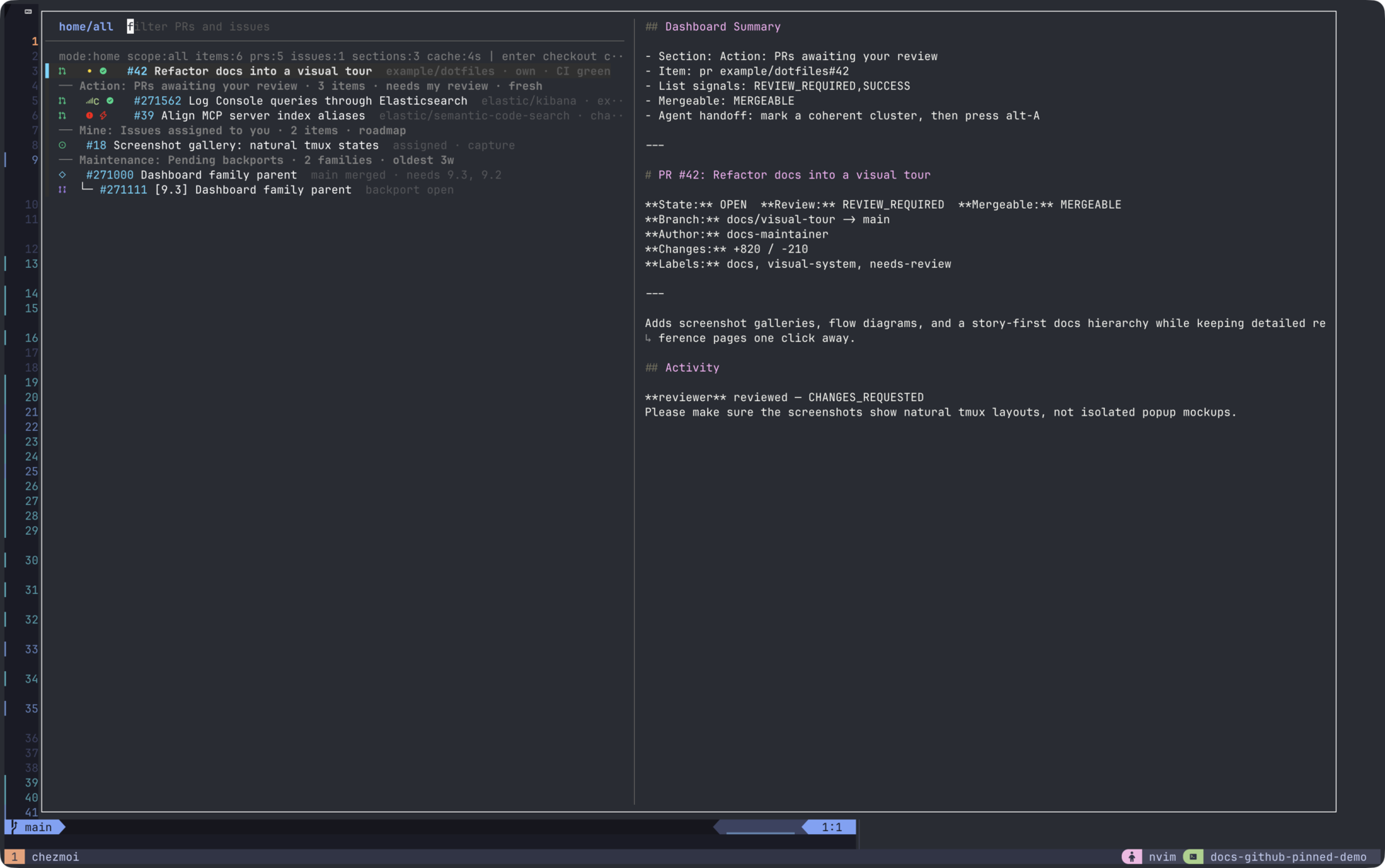
From the dashboard, without leaving tmux:
- Create tickets —
alt-iopens$EDITORto file a new issue;alt-Efiles an epic (parent + sub-issues). - Clone and check out —
enteron a PR/issue creates a worktree and focuses its session. If the repo isn't local yet, it's bootstrapped first (,gh-tfork), so cloning, worktree creation, session creation, and issue↔branch linking all happen in one step.ctrl-tbatches this across marked rows. - Act on PRs —
alt-xopens a command palette (approve, request-changes, merge, label, comment, request review);alt-cadds a comment;alt-bchecks out and opens an Octo review;alt-oopens in the browser.
alt-g switches between this dashboard and the session picker in place. See GitHub picker.
Agentic Tasks: Offload Work To Assistants
Assistants are governed by a version-controlled SOP + skills layer, so behavior is consistent across tools and respects each repo's rules. See The Agentic Operating System.
The CLI assistants, in the order this setup leans on them:
- Cursor CLI (
cursor-agent, aliasedagent) — the primary interactive harness. - Codex (
,codex) - Pi (
pi) - Claude Code (
claude)
agent      # Cursor CLI (primary)
,codex
pi
claude
Per-tool configuration (auth, models, MCP, profile merging) lives in Tool configs. When you run claude, cursor-agent, pi, or copilot inside tmux, Alt-Enter prepends a calibrated verification scaffold and leaves the prompt editable (toggle with prefix + W); plain Enter is never touched.
Across sessions, agents carry context through two memory layers: short-lived per-workspace hook memory (/tmp/specs) and a durable knowledge base (,ai-kb). See Agent memory.
Review
- Use
alt-bin the GitHub picker to check out a PR and open an Octo review in a new window. - To review the changes an agent produced before committing, use the
tuicrdiff loop, or keeplgtmopen in a pane beside the agent, which feeds structured feedback back to the agent. See Reviewing agent diffs.
Code: Keep Your Editor
You can run this whole workflow from VSCode/JetBrains using the integrated terminal — the pickers and assistants are just tmux popups and CLIs. Neovim is available if you want it, but it is optional.
When Neovim is the editor, it stays inline. Tool-specific UI, such as the vim.pack dashboard, opens inside Neovim rather than as a separate tmux popup.
Cleanup
There's no separate teardown step: kill sessions with ctrl-x and remove finished worktrees with alt-x directly from the session picker as you go.
Maintenance
Update dotfiles:
chezmoi update
Update packages, then reconverge:
brew update
brew upgrade
chezmoi apply